What "Force Hotspot node" dies on a Node Icon?
Answered
On the web interface of my Node Icon, under Diagnostics page, there is a button to force Hotspot mode. Can anyone tell me please what it does and what is meant for?
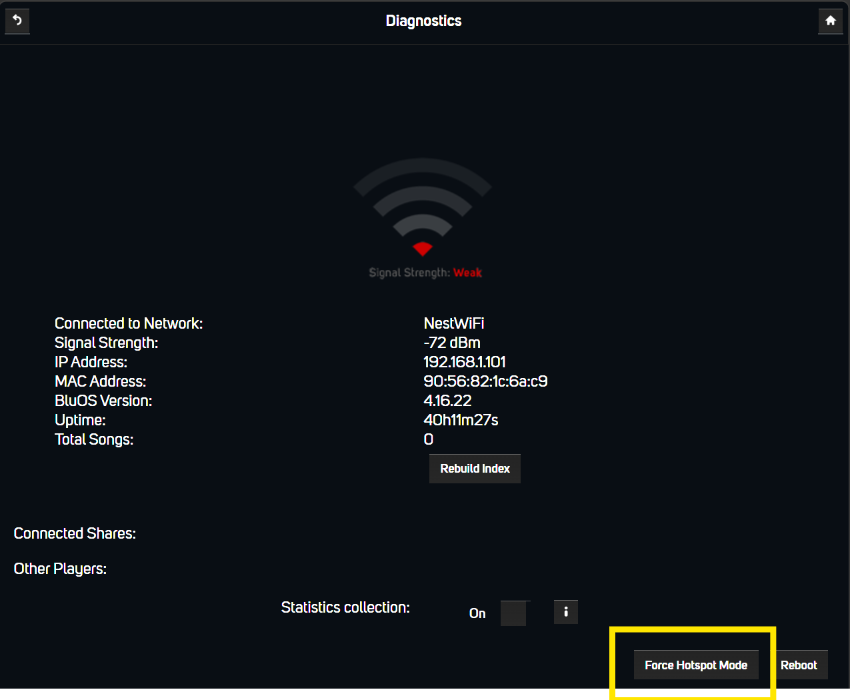
I noticed lately that for some reasons my Node Icon connects frequently to the main Modem WiFi under 2.4Ghz and this is a quite weak connection, while there is in same room a Mesh repeater that has very good connection under 5Ghz. Which one is used vary by the day and reliability is impacted; was wondering if this button can help.
-
Official comment

This resets your WiFi configuration, creates a WiFi Hot Spot on the ICON. You then join the Hotspot on your mobile device and use the BluOS app to setup WiFi on the ICON.
However I would use the BluOS App to raise a support ticket for support to help with your Nest Router / Mesh settings.
-
Yep, done that :)
0
Please sign in to leave a comment.
Comments
2 comments