[edited] Bluesound Node Icon becomes very hot and disconnect from WiFi after upgrade to 4.16.22
Answered
My Node Icon is connected via WiFi to the network and streams Spotify for several hours a day (background in my home office).
I noted that recently it becomes very hot in one specific spot at the center of the top (see picture). This part is warm even when in stand.by, does neve get cold as the rest of the chassis, and becomes hot - I mean, touching it you cannot stan with your fingers on it - while in use.
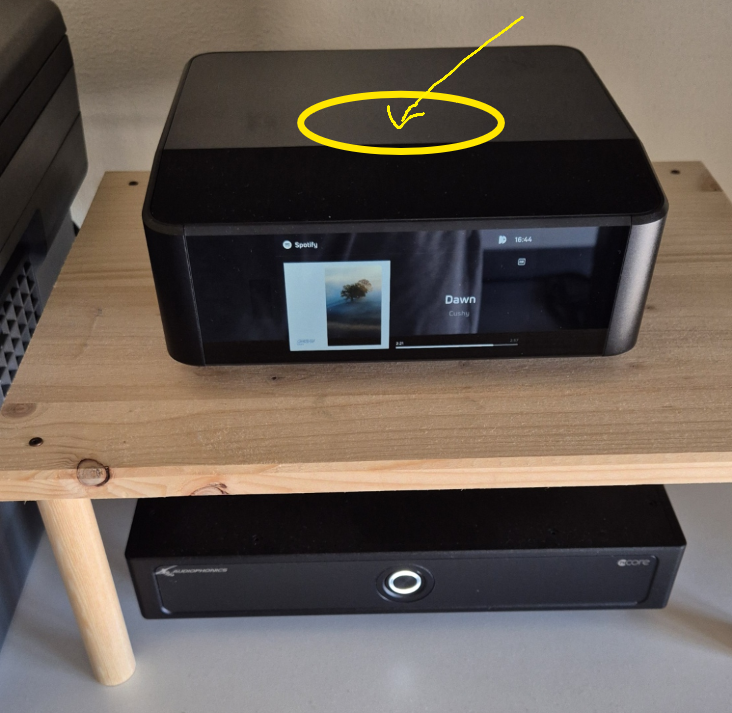
One day it suddenly stopped, I believe due to thermal protection as I had to get it cool down a bit before streaming. It sits on top of a wooden little rack I created so it does not sits just above to the power amplifier.
Further testing, and I can add:
* It started since latest upgrade to v4.16.22
* What fails is the network... the device disconnects after 10 minutes or so from the network, and both Spotify or the Controller app des not see it anymore. After a while, it do appears once again and the cycle repeats...
I switched it off, will wait 5 minutes and then restart it testing Radio Paradise to see if is a Spotify linked issue of some sort. Will update the thread accordingly.
-
Official comment

Hi SKA
It is not unusually for home electronics products to run as high as mid 40Cs. To be sure though, feel free to select Send Support Request in the BluOS App. One of our Support Crew will reach out and gather some more details.
-
Thanks Tony, will do. After some further testing today I was able to run 30 minutes on TuneIn with no drops, but as I moved back to Spotify it disconnected quickly. Will report this behaviour to the support team. Got issues connecting to Radio Paradise, will try a router reboot tonight.
I'm wondering if the stream rate can be part fo the issue as TuneIn stream was just 320kbit/s while I keep Spotify in Lossless.0 -
I opened a case as you suggested, and mentioned the key issue being the network drop. I tested all viable sources, and the device after 10 mins of playing (Radio / Radio Paradise / Spotify) simply get's disconnected from the WiFi, not appearing anymore on the modem devices list either. The IP is no more responsive - I have a fixed lease, the IP never changes - and the device does not reconnect anymore either.
It was working just fine until the .22 firmware update. Let see what the support team will discover. The fun part is that until I do not stream anything, the device remains properly visible and connected to the WiFi, for any long period. Is when I start using it that after a short wile is "kicked off", nothing occurring in past several months I enjoyed it.
I did a full (router and device) switch off, with a pause of 10 mins before reconnecting, but this did not help.
0
Please sign in to leave a comment.
Comments
3 comments