Set multiple BluOS players to exactly the same volume with one action?
Answered
Hi everyone,
I’m running multiple BluOS devices in my home (3 Powernodes and 2 Flex 2i units), and I’m trying to find a way to set them all to exactly the same volume level with a single action.
Even when they are grouped, I regularly notice that the volumes aren’t perfectly aligned. Over time they seem to drift slightly, which can be quite frustrating, especially when moving between rooms and noticing small but audible differences.
What I’m looking for is a simple way to instantly set all players (or a group) to one identical volume level (for example, all at 25%) in one step.
Is there a built-in way to do this within the BluOS app?
Thanks in advance!
-
Official comment

Hi,
Please reach out to our support crew by sending us an email at support@bluesound.com or by submitting a support request directly through the BluOS app.In the BluOS app, simply go to Help > Send Support Request and a member of our support crew will be happy to assist you further.
-

I'm not sure that different sound systems in different rooms would ever sound as though they were at the same volume for the same volume setting in the controller app simply because nothing will be the same.
So.. exactly what are you seeing and hearing, and how are you making this determination?
0 -
Thanks for your reply, I understand what you’re saying about different rooms never sounding exactly the same in terms of perceived loudness. Acoustics, room size and placement obviously play a role.
However, in my case all rooms use the same Bowers & Wilkins in-ceiling speakers, driven by BluOS Powernodes (except the 2 Flex 2i´s). So from a hardware perspective, the setups are very comparable. I’m not expecting identical perceived SPL across rooms, but I do expect that when I set them all to, say, 25%, they should at least be digitally aligned at the same volume value.
What I’m experiencing is that even when grouped, the sliders don’t stay perfectly matched. Over time they drift slightly. The attached screenshot shows an example where the volumes are clearly not identical anymore, even though they were grouped.
Also, sometimes I intentionally adjust one room temporarily (for example lowering the bathroom or kitchen), and later I simply want one action to bring everything back to the same baseline level again.
So my question is less about acoustics, and more about whether BluOS has a way to force all grouped players back to one identical volume setting numerically.
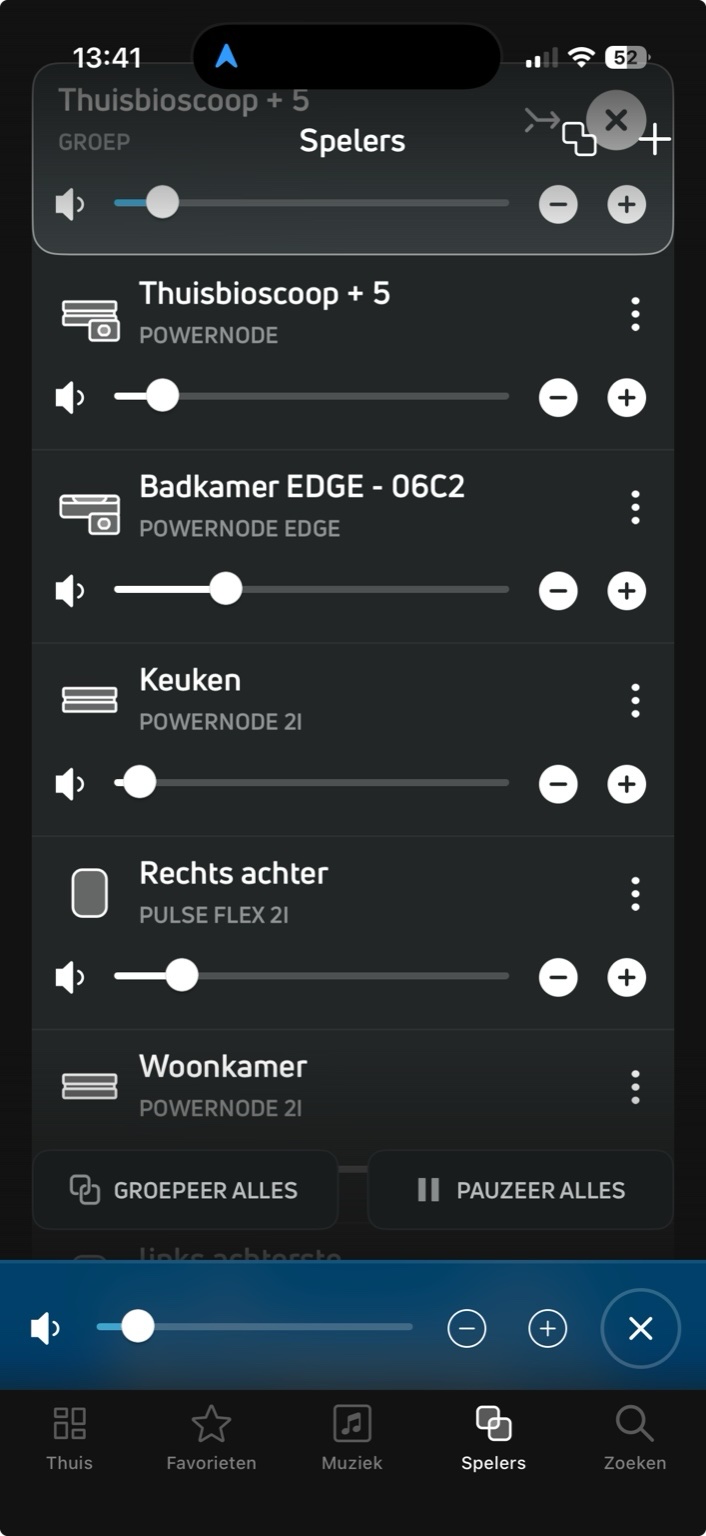
By the way, it’s impossible to capture all devices in a single screenshot....
0 -
Many thanks for expanding upon the issue.
Are the different volume levels audible, or is it just that the sliders are no longer visually aligned?
0 -

All your POWERNODE devices are not the same, they have different power output ratings, so they will be at different volume levels (in the BluOS App) to match.
0 -
I understand that the different Powernode models have different maximum power ratings.
However, maximum wattage shouldn’t determine relative volume alignment at normal listening levels. The volume percentage in BluOS represents digital attenuation (gain) before the power amplification stage. So the same percentage on different units should represent the same relative output level, regardless of whether an amplifier is rated at 60W or 80W.
Maximum power only defines how loud a unit can go at its limit, not how the scaling behaves at moderate levels. In my case, all rooms use identical Bowers & Wilkins in-ceiling speakers, and none of the amplifiers are anywhere near their limits. So I wouldn’t expect different app values to be required simply because the amp models have different peak power ratings.
What I’m experiencing is that grouped players don’t remain numerically aligned over time, and the small differences are also slightly audible.
Manually correcting this isn’t very practical either. The volume sliders in the app are quite sensitive and not particularly precise, which makes it surprisingly difficult to align multiple players accurately by hand. You end up constantly adjusting and re-adjusting.
That’s why a simple “set all to the same level” or re-sync function would make a big difference in day-to-day use.
For the record, the current setup consists of:
-
1 × POWERNODE
-
2 × POWERNODE 2i
-
1 × POWERNODE EDGE
-
1 × POWERNODE (N330)
-
2 × PULSE FLEX 2i
0 -
-
You are showing some significant differences between the volume slider positions on each device.
Are the individual slider positions also accurate reflections of the volume levels that you are hearing in each room? In other words, are they in the correct positions for what you are hearing?
0 -
Thinking about this ..... I have one Bluesound device (a Vault 2) and I have the controller app on multiple tablets, phones and Windows PCs.
What does work is that if I change the Vault's volume using the controller app on one device then the volume sliders on all of the other apps all move to reflect the new volume setting.
What you are discussing is quite different, however.
Are you reporting a bug or are you requesting new functionality?
0
Please sign in to leave a comment.
Comments
8 comments