BluOS controller app on Linux
Answered
I'd just like to put in a plug for supporting the BluOS controller app on Linux. All of my home computers run Linux Mint 18.1, which is closely related to Ubuntu, and my work-at-home machine is running RedHat Enterprise Linux 7.6. I realize it's a niche market, but it's growing, and I bet it's pretty similar to MacOS under the covers.
-

Watch out for the cache on Linux. This app uses a directory under ~/.config instead of ~/.cache (namely: ~/.config/BluOS Controller/Cache/Cache_Data/) and the content can be quite voluminous. Not necessarily in terms of size (mine was 76 MB when I discovered it) but the number of files is surprising: over 5000 for those 76 MB.
I found this cache when searching for the source of a high rate of disk writes while something is playing, but it also means that my backups have been including this useless data all along. 🙄️
0 -

Wow, thanks for the heads up! I did not notice that behavior!
0 -

Running this build on Mx Linux 25.1 xfce the left scrollbar is missing. Anyone else seeing this? Other two scrollbars are displayed ok.
0 -

Chiming in here from popos with cosmic / wayland.
Josh version v4.12.1 works mostly. Some gui hangs.
v4.14 doet not start, not with the fedora fix, not with ozone.
Complaint from the terminal:
~/Applications$ ./bluos-controller-linux-4.14.0_6e468e91f80457ba5cb694ca2d51589a.AppImage
qt.qpa.plugin: Could not find the Qt platform plugin "wayland" in ""0 -
Ok, back with the findings from my system.
Popos 24 with cosmic / wayland.
4.14 works fine. It does require the ozone flag
One of the refusals to start was a trashed reused config folder.
rm -rf ~/.config/BluOS Controller
cleared that.
Putting the ozone flag in electron conf did not work. Adding it as a parameter to the appimage launcher did work.
The clearest fix I found was just to edit the desktop launcher that was created for the appimage launch and adding the ozone flag to that:
~/.local/share/applications$ cat appimagekit_ce09f9ea8f0617b9c58d2a7d200b2ab5-BluOS_Controller.desktop
[Desktop Entry]
Name=BluOS Controller (4.14.0.41)
Exec=/home/jonathan/Applications/bluos-controller-linux-4.14.0_6e468e91f80457ba5cb694ca2d51589a.AppImage --ozone-platform=x11 --no-sandbox %U
Terminal=false
Type=Application
Icon=appimagekit_ce09f9ea8f0617b9c58d2a7d200b2ab5_root
StartupWMClass=BluOS Controller
X-AppImage-Version=4.14.0.41
Comment=BluOS Controller
Categories=Utility;0 -
Just a heads up, v4.14.1 is now posted on GitLab and on the AUR.
https://gitlab.com/zquestz/bluos-controller-linux
https://gitlab.com/zquestz/bluos-controller-linux/-/packages/61595331
https://aur.archlinux.org/packages/bluos-controller-appimage2 -

Hi Josh, thank you for your work on that. I've currently the problem to get the appimage running on cachyos. It starts without any failure, but no window is popping up ...
KDE-Plasma-Version: 6.7.1
KDE-Frameworks-Version: 6.27.0
Qt-Version: 6.11.1
Kernel-Version: 7.1.1-2-cachyos (64-bit)
Graphic-Platform: Wayland
Any idea why this is not working anymore, older version did run before, but now also refusing to work.Thank you very much
0 -
You need to make sure to use the following flag when you launch it.
--ozone-platform=x11
For some reason it doesn't work on Wayland without it.
0 -
Thank you very much Josh, works fine now. Many thanks for your effort on running BluOS App on Linux!!!
1 -
4.16.0 is now available.
https://gitlab.com/zquestz/bluos-controller-linux/-/packages/663232401 -

Thanks again! Works like a charm...
0 -

Abe wrote:
Watch out for the cache on Linux. This app uses a directory under ~/.config instead of ~/.cache (namely: ~/.config/BluOS Controller/Cache/Cache_Data/) [...]wow. Good catch. Thanks. Mine contained:
74800 files
with 484M in ~/.config/BluOS Controller/Cache/Cache_Data/0 -
Does anyone know why the leftmost scrollbar has disappeared on my MX Linux system with these later releases?
Here is the bar in 4.12:
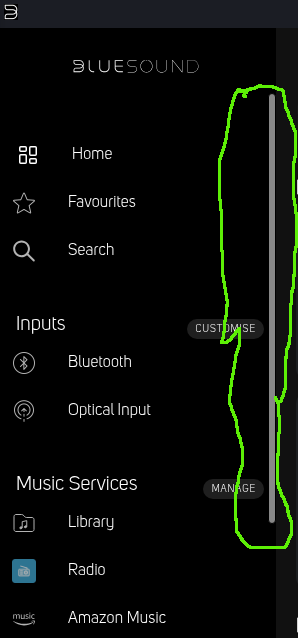
But in 4.16 it's missing:
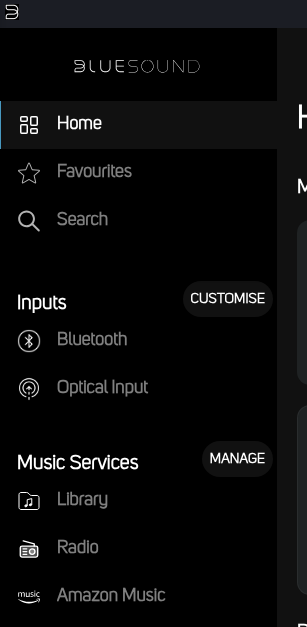
Other two scrollbars are displayed correctly
0 -

Just tested and missing from mine too.
I never really see it as my left menu is tiny, most things are removed
0 -
4.16.1 is now available. There is still no scroll bar, but scrolling works with a scroll wheel. =\
0
Please sign in to leave a comment.
Comments
225 comments