Several songs are not playable in Amazon Music Unlimited
Answered
Since a few days ago, several songs are not playing anymore from Amazon Music Unlimited. These songs (special all from Pink Floyd and some from The Who) are avaiable since some years. I can see the songs in the controller apps (iOs and MS-Windows), but they are not started for playing. It's no problem to play them the Amazon App. What's happen?
-
Official comment

Hi Josef
We are seeing reports of Amazon Music Unlimited suddenly now offering 32-bit content at 192 Khz on select tracks. This is a new format not previously available. Your BluOS Player offers up to 24-bit / 192 Khz content. We can confirm this is the case with Pink Floyd's catalogue.
Check your Amazon Account Settings to limit Playback to HD/Ultra-HD Playback. We are told this can be done in the Amazon Music App. Contact Amazon Music Support for more details.
In the meantime our Product Development Team has in turn reached out to Amazon about resolving this and ensuring our API is picking the right content given their change in offerings.
Thanks for your patience and understanding.
-
Hello Tony,
thank you for your answer. That makes sense. I have tryed different settings in the Amazon Music Unlimited account for the Audio quality, but they haven't an effect for the BluOS Player. The player want always play with FLAC 32/96, what is in the moment not possible, as you wrote above. But Amazon has simlilar problems in its own Windows App. In this App, I have to set the music quality to "Standard". Otherwise the songs are also not playing. But this is a local setting for my computer and should not have an effect for the BluOS Player. So as I see, I have to wait for future updates, isn't it?
0 -
But this is a local setting for my computer and should not have an effect for the BluOS Player. So as I see, I have to wait for future updates, isn't it?
No - these should affect your Amazon Account. It is unlikely we can 32-bit playback from software, as the DAC also needs to be compatible. What will happen is we will work with Amazon to adjust their API to specifically pick the 24-bit version rather than 'best quality available'.
0 -
Hello Tony, that's also ok for me. 24bit is normally good enough. I hope Amazon will do this. What a pitty, they don't support MQA.
0 -
Hello Tony, many thanks for your support and help. Since last Friday, the Amazon Music works very well again.
0 -

Good afternoon
this continues to be an issue with my 2i model (as of Oct 12, 2025). I use an external DAC connected via optical cable which is capable of 32bit processing but I get either no sound or extremely choppy sound when these tracks come up. is there any sort of estimate to when this will be resolved?
0 -
HI Eduardo
Your BluOS Player is a 24/192 capable device. It is not capable of 32-bit processing. Please see your Amazon settings to limit playbacl to 24-bit. This is a hardware limitation and cannot be altered in software. Thanks for understanding.
0 -
thank you for the answer but I am at a loss as to where these settings are located. when I log on to Amazon music itself, the only options are to use highest possible resolution available or standard. I don't see the option to "limit to 24 bit"
are these settings in the BluOS app? where exactly do I need to set this up to limit to 24bit?
0 -

Amazon Music used to have a gear icon to go to settings. It is no longer on my app. Did you find the music streaming quality settings?
0 -
Hello
there are settings in Amazon music but the only choices are to "Stream HD/Ultra HD" or "Standard"
there is nothing in amazon settings that limit quality to 24bit as Tony W explains above so for now I cannot listen to most Pink Floyd Songs in 24bit and Pink Floyd happens to be my favorite group. There are several other songs that this is happening to so I am unbelievably frustrated with the player and with Amazon Music for not finding a solution to this issue. if I wanted compressed files I would just use cruddy Spotify or something..
0 -

On the AM website page, click on the silhouette (or your photo) in the top right corner, and in the dropdown list select "Audio Quality". Mine has always been set to highest quality. I haven't (as yet) experienced any non-playable tracks, but I noticed that there is a second option in the audio quality settings to auto adjust audio quality for network speed. I can't recall seeing that before, but it is set to "On".
There is no explicit method of selecting up to 24-bit only, or no 32-bit tracks that I'm aware of.0 -
thank you @Phil 3100 . that is exactly my frustration. Tony W above lists the solution as "Please see your Amazon settings to limit playbacl to 24-bit" and that is not something I can see anywhere on Amazon Music or the Bluesound app to do. all the meanwhile, Pink Floyd's Animals, and several other albums of theirs don't play and there are lots of other songs from other artists that either don't play at all or are garbled. There are still lots of songs that play fine but with Floyd being my favorite band this is a huge bummer for me! I want HD Music playing, it's the entire reason I pay for the service and the reason I bought the streamer but for now that is not happening :(
0 -
Hello Eduardo, hello Phil 3100,
as you can see, I started this conversation about 1 month ago, because I have had also these kind of problems. The only thing we users can do is set the music quality to "Standard" in our Amazon account. Don't worry, Amazon will play the music in a range from 16bit/44.1kHz to 24bit/192kHz. But the effect of this setting was not immediately (at least for me) and I don't know, what Amazon has done. I see the effect some days later (strange?) But now, I can play every music even the Pink Floyd. See the answer from Tony above:
"
-
No - these should affect your Amazon Account. It is unlikely we can 32-bit playback from software, as the DAC also needs to be compatible. What will happen is we will work with Amazon to adjust their API to specifically pick the 24-bit version rather than 'best quality available'.
"
Also my setting in the main Amazon account (not a APP)
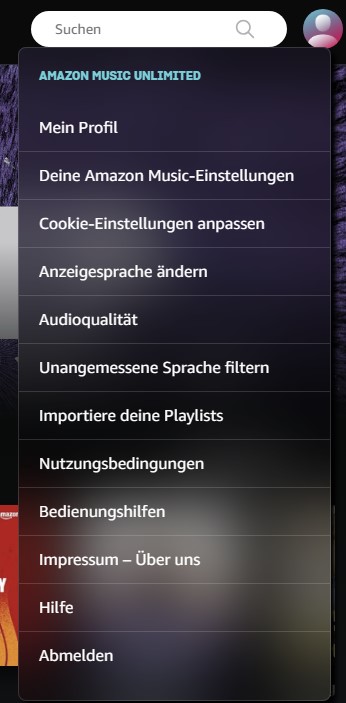
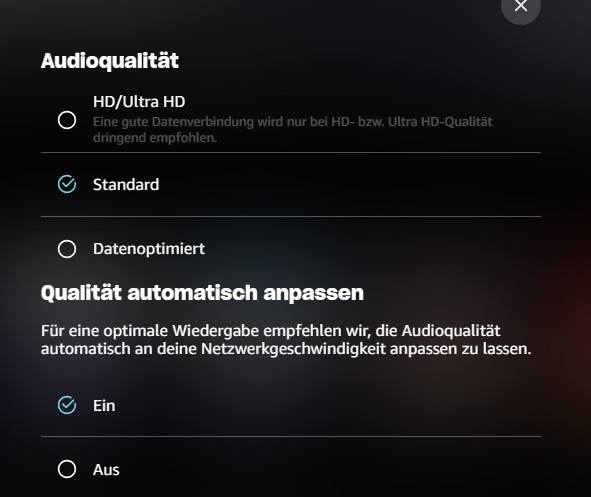
0 -
-
@Eduardo I have just tried playing Animals on Amazon Music through my Node, both the standard album and the 2018 remix, and it plays fine with no issues. It is playing at Ultra HD (FLAC 24/192) for both albums. I've tried several other Pink Floyd albums/tracks at random and all played at the same resolution. I'm selecting them via the BluOS Android app BTW.
My AM audio settings are Audio Quality HD/Ultra HD, and Auto Adjust Quality for Network Speed. I'm streaming over a gigabit ethernet connection and I have an AM Unlimited subscription in the UK.
Sorry that I can't be of any more help, but I have not come across any unplayable or problematic tracks.0 -
@Josef. Sorry, your post wasn't visible to me when I replied to @Eduardo above, even though it says you posted it a day ago. I've just received a notification for you post 15 minutes ago, so I assume it was subjected to waiting for approval from the moderators :(
As you can see from my reply to Eduardo though, I have not seen any issues and still have my AM audio set to HD/Ultra HD. Pink Floyds' Animals, which Eduardo says is problematic for him, was streamed for me at 24/192.
0 -
@Phil 3100
No, this was only a comment from my experience. Maybe it's help a little bit to solve the problem from Eduardo. But obviously has the AM music quality setting no influence for the BlueSound units. By the way I'm using the Node 130. The only reason why I have set it to "standard" were problems with the AM desktop app. Also in this app, the Pink Floyd songs don't play. But it was in the past. Now they are working very well in HD/Ultra HD. Maybe their API is modified or what else. At the end, the music streaming is now working.
1 -
Thank you Josef, Phil & Eduardo for sharing your comments. I purchased a trial Tidal subscription to compare with Amazon. I am experiencing fewer issues with Tidal but Tidal does not have as many offerings in ultra HD as Amazon for “classic vinyl rock”.
0 -
@Michael Daniels I also took aTidal trial subscription a few months ago, in frustration at having had some issues with my Amazon playlists, which I since discovered that I could overcome by loading AM in a browser where I could copy and edit them more easily than in the AM apps. Anyway, I found Tidal's reproduction really flat and lifeless compared to Amazon Music on my system. Whilst I may have been able to mitigate that using the tone controls, my Node is pretty much perfectly balanced sound-wise with my turntable and CD player, so I decided to stay with AM and have no regrets.
0
Please sign in to leave a comment.
Comments
18 comments