BlueOS ready for Spotify lossless ?
Answered
Hi, Spotify lossless is ready for many users. Is BlueOS ready for Spotify lossless ? Thank you.
-
Official comment

BluOS is ready for lossless, we have been waiting for Spotify to turn on Redbook for some time! BluOS users have access right now!
And from their announcement we should likely add this:
When can I start listening?
Lossless is rolling out gradually to more than 50 markets through October. Premium subscribers in Australia, Austria, Czechia, Denmark, Germany, Japan, New Zealand, the Netherlands, Portugal, Sweden, the US, and the UK have already started to get access.
so it is not everywhere yet. But we have it fully supported, so regardless of where you are and when they turn it on, we got you.
-
Perfect ! Thank you
0 -

Truly amazing. Been a long wait.
Thank you.0 -

Amazing support!
0 -

In the UK here but my Spotify account has not yet updated 😭
0 -
Seppi - I feel ya :-)
0 -
Thank you, it’s actually a family account but want to give it a go.
0 -

This is a real difference! Superb and fast work from Bluesound!
1 -

I've read Spotify's instructions for how to select lossless in their app. It's not available for me yet (Chicago, btw) but I'm not sure it matters because when I'm using Spotify Connect with my Node, those quality settings are grayed out. And I don't see any quality settings options in the BluOS app, so how will this work?
0 -
Hi Dan, to be perfectly honest Spotify hasn't been clear on how the access is granted. They have said "over the next month" they will roll it out, and if they are following typically app release protocols they are likely up to 25% global release at this point. We do have feedback from New Zealand, Denmark and the Netherlands that those markets are mostly open, seems family accounts are slower than single ones. When Spotify turns on your account you'll have access. We do have some initial feedback that their app's cache seems to hold onto some settings so a device reboot seems to clear the issue when it crops up.
0 -
Andrew, thank you for the response, but it misses the point of my question entirely. Regardless of when the access gets turned on for me, I'm not sure it matters because, as I said, when I use Spotify Connect with my Node those quality settings are greyed out. So even when "lossless" appears as an option in the Spotify app, it seems to me like it won't matter because I won't be able to select lossless anyway because you can't select the quality in Spotify when using Spotify Connect. So it's not a question of timing or restarting the app at all, since it appears to be the Node that controls the quality, not the Spotify app. My question is: how does the Node "decide" to stream at the higher quality, and how am I to know the bitrate it's using?
-1 -

In addition to the previous post: When will it be possible to configure Replay Gain for Spotify and Qobuz? Just like it is possible with WiiM devices.
0 -
In the connect model there is a hand shake between devices. Spotify gives a code blob that we integrate and essentially it communicates with your device to say what the service levels are and such. In the case of lossless it is up to the Spotify app to tell BluOS it is capable, then to ask BluOS if it is capable. We are fully capable, tested and certified through Spotify and our labs on all devices. The grey you see is your local app waiting for permission, as a test for it I'd reboot my phone and see if it changes. If not then it is at the account level, but BluOS is ready.
0 -
What you said about "your local app waiting for permission" sounds incorrect to me, so I googled it and here's the AI answer I got:
When using Spotify Connect to play music on another device, the quality settings on your controlling phone or computer are greyed out because the other device is streaming directly from Spotify's servers. Your phone is only acting as a remote control, not the source of the audio stream.
This is by design and provides several benefits:
Best possible audio quality: Spotify Connect devices, such as a smart speaker or AV receiver, will automatically pull the highest quality audio stream available (up to 320kbps for Premium subscribers), independent of your controlling device's settings.0 -
Perhaps Bluesound has an email address for technical questions that I can use?
The BlueOS app, from what I can see, does not display bitrate info when using Spotify Connect. So I will never know for sure if I'm listening to lossless audio from Spotify until that feature is added. This is a problem.
-1 -
For the quality indicator, Spotify has specific requirements, please direct any comments about the lack of specific quality to Spotify themselves.
0 -

Hi Dan
The Support Crew will be happy to help by;
- Selecting Settings, Send Support Request in the BluOS App
- email support@bluesound.com
- 1-855-531-4666 M-F 8:30-4:30 Eastern North American (+5 GMT)
0 -
"Send Support Request" opens a ticket for your specific product and emails it to the support team, it also includes a copy of the log file so the support crew can have access to it
0 -
Thank you, I'll use the "send support request" because that seems to be the preferred method.
Right now, this appears to be the bottom line: those of us using Spotify Connect with our Bluesound products have no way of confirming the bitrate/quality of the music we're listening to, so the long wait for Spotify to offer lossless audio is all for nothing, because we won't know whether or not we're actually getting lossless or not.
0 -

I had a similar problem getting my BluOS device to play Spotify on the lossless setting. I could play lossless on my iPhone, but not on the BluOS device. Rebooting the device didn't solve the issue. However, logging out of my player from Spotify (Connect) and logging back in solved the issue, and I now see the lossless badge when playing through my BluOS device.
To address another comment/question, you can see your bitrate in Spotify either by clicking on the player in Spotify Connect or, in the case of lossless, looking for the green lossless badge next to the player icon at the bottom of the Playing Now window in Spotify.
2 -
Gary, it sounds like you're saying that the BluOS app on your phone will show the appropriate badge to indicate that Spotify is streaming a lossless file. That's what I'm trying to get Bluesound to confirm for me, so I appreciate the insight.
As for your comment that you can see the bitrate in the Spotify app, well I've never seen that and I can't follow your instructions either so, that will remain a mystery I guess. I realize that Spotify has added the lossless badge to their app, but my whole point with this thread is that the quality settings in the Spotify app (that Bluesound keeps directing me to, to my great frustration) are completely erroneous, they have no effect whatsoever on the quality that the Node is providing. And the proof of it is the fact that those quality settings in Spotify are *disabled* when you're connected to the Node (or presumably any other streamer device).
0 -
To clarify:
1) The Spotify app will show if it is streaming lossless audio to a device through a badge at the bottom of the Now Playing screen.
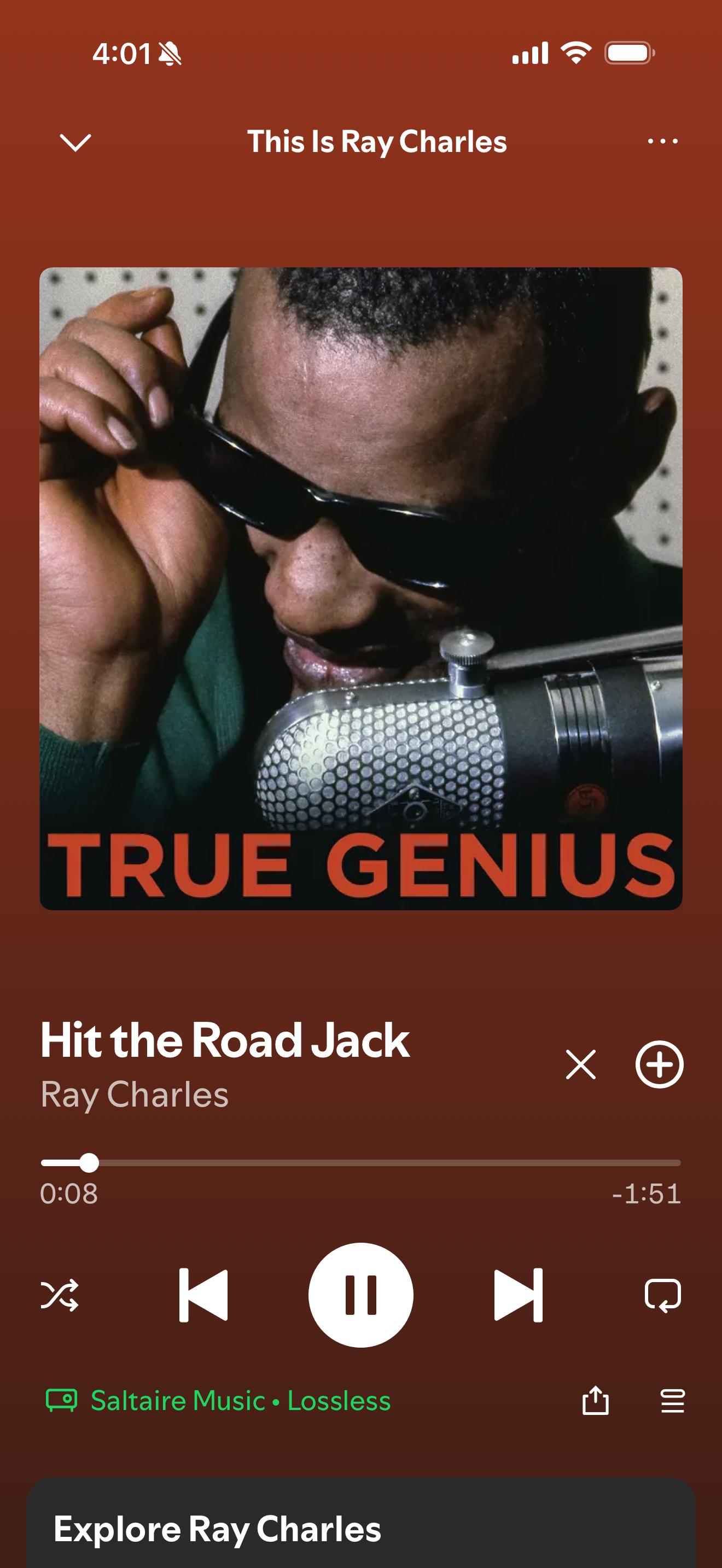
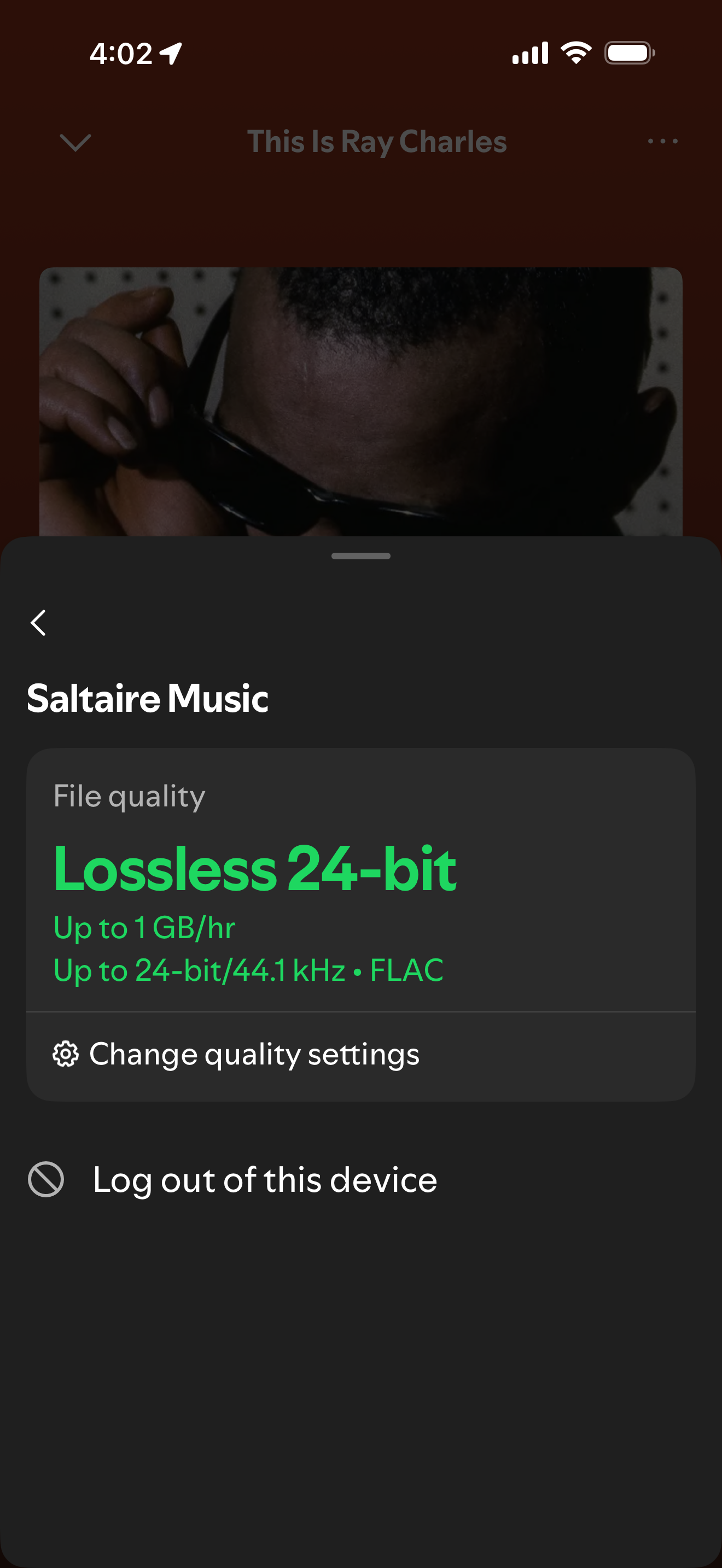
2) To see the bitrate (even if not lossless) that Spotify is streaming to a device, click on the device (for example Saltaire Music in the example above) which will bring you to the Connect menu. Click the arrow next to the device and it will display the bitrate. See below. (Also, where it says "Log out of this device" is what I clicked to "reset" my BluOS device ("Saltaire Music") to allow it to start playing at the lossless setting.
 3
3 -
Thank you Gary
Full disclosure: our offices are in Canada, so we do not have Lossless access just yet. This, however, lines up with what my colleague Andrew suggested based on his communications with Spotify's development team;
We do have feedback from New Zealand, Denmark and the Netherlands that those markets are mostly open, seems family accounts are slower than single ones. When Spotify turns on your account you'll have access.
0 -
Thanks, Tony. The main point of my original post was just to give you and others a heads up that, even when the Spotify access is "live", I had to log off (and log back in) my BluOS player in Spotify Connect for Spotify to recognize that your player is compatible with lossless (before logging off, the lossless option was grayed out and Spotify would explain that your player is not compatible). Rebooting my BlueOS player (as someone suggested on some other forum) did nothing for me to enable lossless on the player. I'm guessing you may be getting a lot of troubleshooting requests about Spotify lossless in the coming weeks/months..
1 -
Thanks Gary, the screenshots made everything crystal clear.
0 -

New Zealand Icon user. And Spotify lossless has stopped all album artwork from appearing on the Icons screen. Just a Spotify logo and no song identified. Ive emailed Bluesound and they said we're aware of the issue and are working on it. Be nice to get an update as its a huge issue
0 -
Not sure how to post photo eveidence
0 -
^^^
Richard, a software update / fix is due later on today.0 -
Well that is indeed excellent news. Thanks
0 -

Thanks a lot for this thread! I just want to confirm that for me with a Spotify family account and an android phone - just logging into the BlueOS app and logout from my spotify account (and not logging in again since option is no longer there for me) solved everything!
My spotify app now
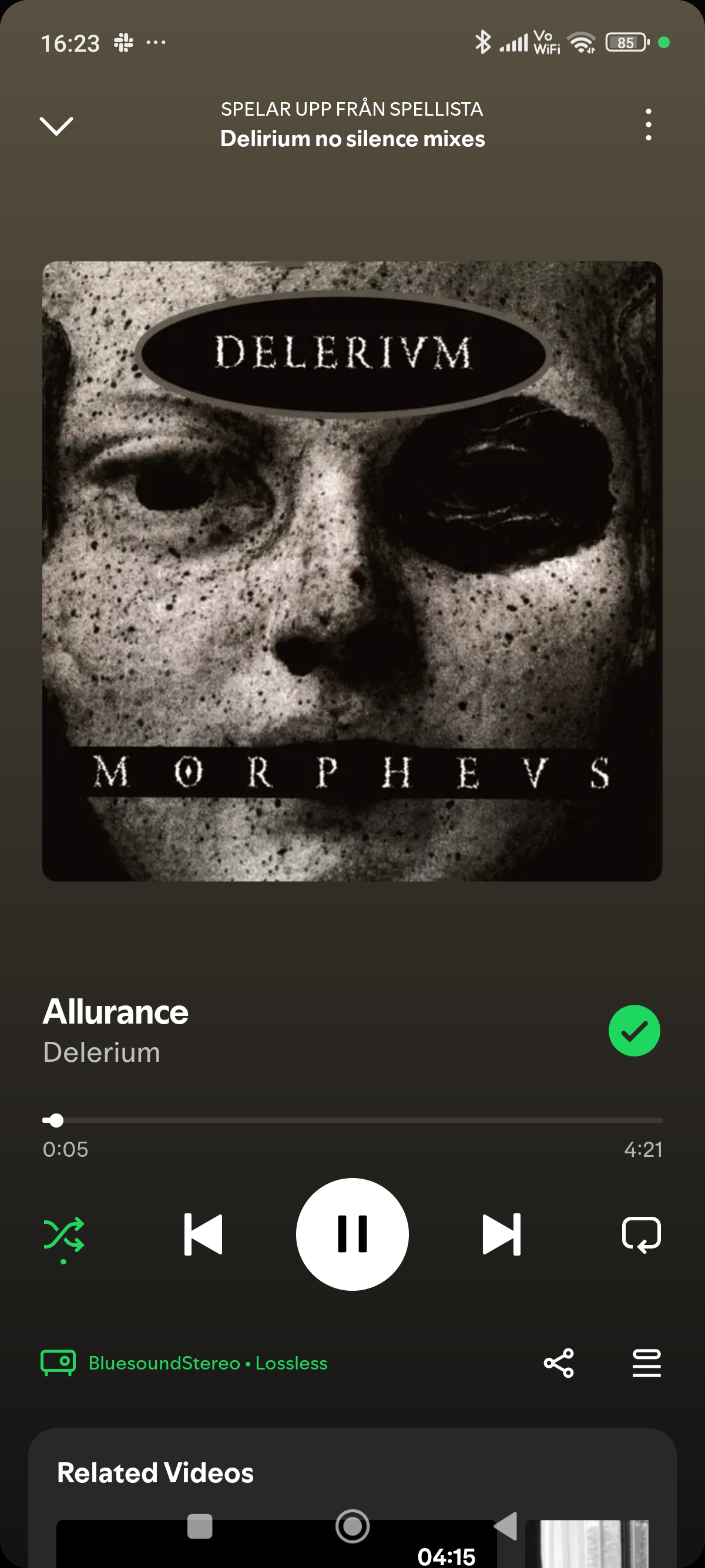
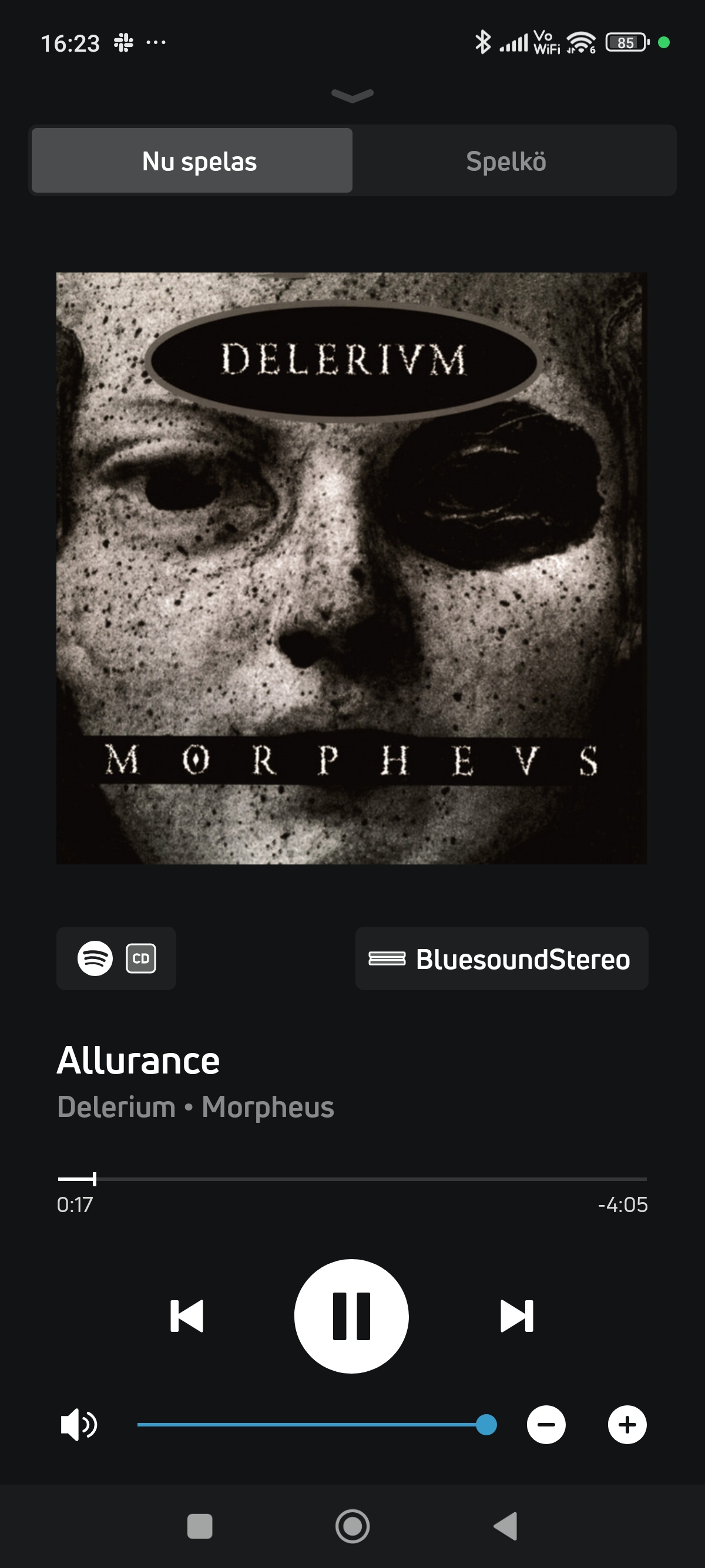 showes BluesoundStereo Lossless and the BlueOS app shows a CD logo when streaming :)0
Please sign in to leave a comment.
Comments
34 comments