NAD M10 V3 - Blueos Startup problems?

After years listening/streaming music via the Squeezebox Touch & Raspberry PI /Picoreplayer, I decided to go for something professional and bought a NAD M10 V3.
Very nice device although it becomes very warm (our average room temperature of 30 degrees C here in the Caribbean doesn't help of course), but meanwhile I understood it was built to deal with temperatures even up to 90 degrees C !!
But I am struggling with the Blueos App.
First, on my Samsung phone (Android 14) it would lose connection everytime until I finally found out (thanks to internet) that it doesn't like 5 GHz, so I switched back to 2.4 GHz and voilà one problem solved. On the other hand, on my wife's phone (Android 16) 5 GHZ is no problem.
But my second problem I have not solved yet:
I use eARC for sound from the TV, listen to radiostations via Tunein and of course listen to my own music collection on USB stick. I made a Blueos playlist. So far so good.
But everytime is switch the source and come back to my playlist it restarts with the first song of the playlist (2600 songs). It doesn't resume at the last position in the queue.
I hope I am doing something wrong because I can't believe it was designed like this. Otherwise it makes the device useless for me. Of course I can switch to shuffle but after changing source it will re-shuffle the shuffled playlist everytime, and after a few days I hear some songs again already.
So what am i doing wrong or is there a workaround for this?
Finally 2 minor aspects:
1. No clock on display at standby ?
2. All my songs have different album art. So if an album has 10 songs, there are 10 different album art (all individually embedded as JPG). However it looks like that Blueos only allows 1 album art for all songs in an album. Is that correct? Or is there a solution for this?
Thanks in advance for your help!
-
Offizieller Kommentar

I'm afraid you did nothing wrong. The feature to resume the playlist at the last played position, after switching sources, has been asked many times over the years but never made it in the firmware.
Even a simple, cheap DAP can remember the last played track in the playqueue when switched off and on.
As for the album art, look for a cover.jpg or folder.jpg in the folder containing the tracks. These take precedence over embedded art, delete them and rebuild the index.
-
Thanks Alain for your swift response.
Unbelievable if what you are saying is true. I think I will set up my Picoreplayer again and use the NAD as amplifier. And boil an egg on top of it when it comes close to 90 degrees C ...
With regard to album art I have no .jpg files. Everything is embedded and used to work fine with my old systems. If necessary I have a (lenghtly) workaround for this: Rename the album title for each song in that album (album name #1, album name # 2, etc.) But before I start with this I want to know if it indeed should be possible (or not) in Blueos to have different art work for each song in the same album.
0 -
I have an embedded art in each flac track (mp3tag is your friend). And I take care not to have any art .jpg or .png in the folder. I have to do it that way because I rarely play complete albums, more individual singles/songs from compilation cd's. After maintenance don't forget to rebuild your index. Also, maybe you have more than one artfile embedded? This could potentially mess up the output. Check this with mp3tag or similar. On my Node2 and Node2i with BluOS, everything works as expected. If on a NAS, depending on the OS, empty the bin.
0 -
I have been using Mp3tag for years and it is indeed my friend. I also do not have complete albums included (unless I like all the songs). I took me months to get separate album art for each song and all files have been throughly checked with MP3tag (thanks for all the tips though).
I never play a specific album only music randomly.
Having said that, all my album art shows up correctly in Blueos but when it concerns an album (name) with more than 1 song Blueos apparently assigns 1 and the same album art for each song in that album, although each track have different embedded artwork.From your answer I understand you don't have this problem?
0 -
Indeed, every song shows it's own art even when together in an album with other tracks.
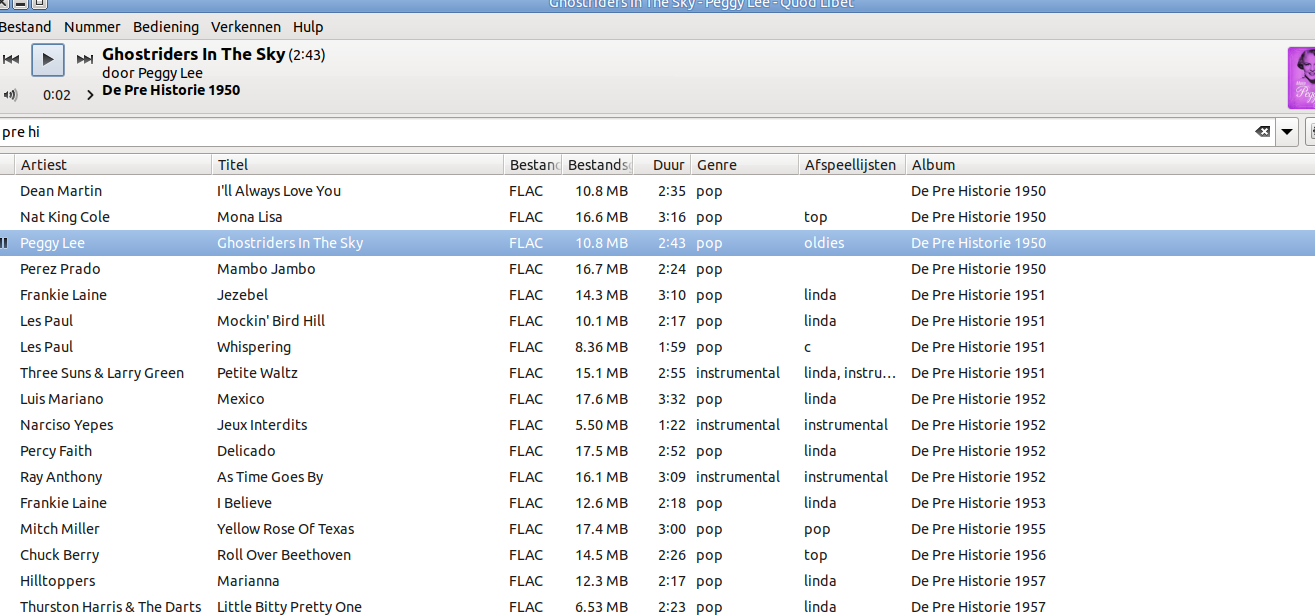
But I should add, on my NAS the tracks are not stored in an album folder but individually in folders by alphabet. So Peggy Lee goes in a folder named "P". Weird, I know but works for me.
Below a screenshot of the structure using Quod Libet player.
 0
0 -
And I guess it also works with multiple songs of the same artist, like Les Paul in your screenshot.
Also hope to get an official answer from Blueos, because I know there are some music systems where only 1 album art is allowed for all songs in the same album (i.e. with the same album name).
Anyway, I will have a look into your setup and do a test. Might be a good workaround.
0
Bitte melden Sie sich an, um einen Kommentar zu hinterlassen.
Kommentare
6 Kommentare