Trouble with Jpg's and them not appearing or disappearing?
Beantwortet
I am making a new post since the old ones are quite old. I am having trouble with BluOS in Windows 11 Home, Windows 10, Android Phone with Jpg files. My Library is quite large (56000 entries) and Album Art is not reliably showing up in the software. Each file has the Image embedded within the tags. The funny thing is I can put an album with 4 composers all with different tags and listed as different albums and half of the art will show up and half will not...
IE: Album: Bach, Johann Sebastian/Album: BWV130/Genre: Sacred Cantata/
on the same CD or Download: Buxtehund Dietrich/Album: BuxWV008/Genre: Sacred Cantata/
Art will show up for JS Bach but not Buxtehund even though Album Art linked to Tags is the same just with different names.
I have gone through each of the following steps with no improvement:
Turned on and off Optimize Artwork
Re-save and resized the artwork and re-taged-image sizes are usually 1200 x 1200 standard now but I used to use 350 X 350 (very early files) 600 x 600 (later files). The disappearing images affect all of the sizes.
Re-tagged the files that have images that do not appear.
Removed the files from the shared folder, re-indexed (made sure the listings were gone) re-tagged the files and restored and re-indexed again with no effect.
Rebuilt the index several time - Usually with no success in bringing up the images or I finally get the images that were missing only to find new files that are missing images even though nothing in the file has changed.
Used several different software to resize, scale and save the Jpg files (Photoshop, Gimp and MS Paint).
Scanned the Hard Drive for errors, Scanned the files with a Flac Verifier etc to see if it was a file error.
Tried different programs for the Tags. My usual is DBPoweramp (software doesn't seem to make a difference)
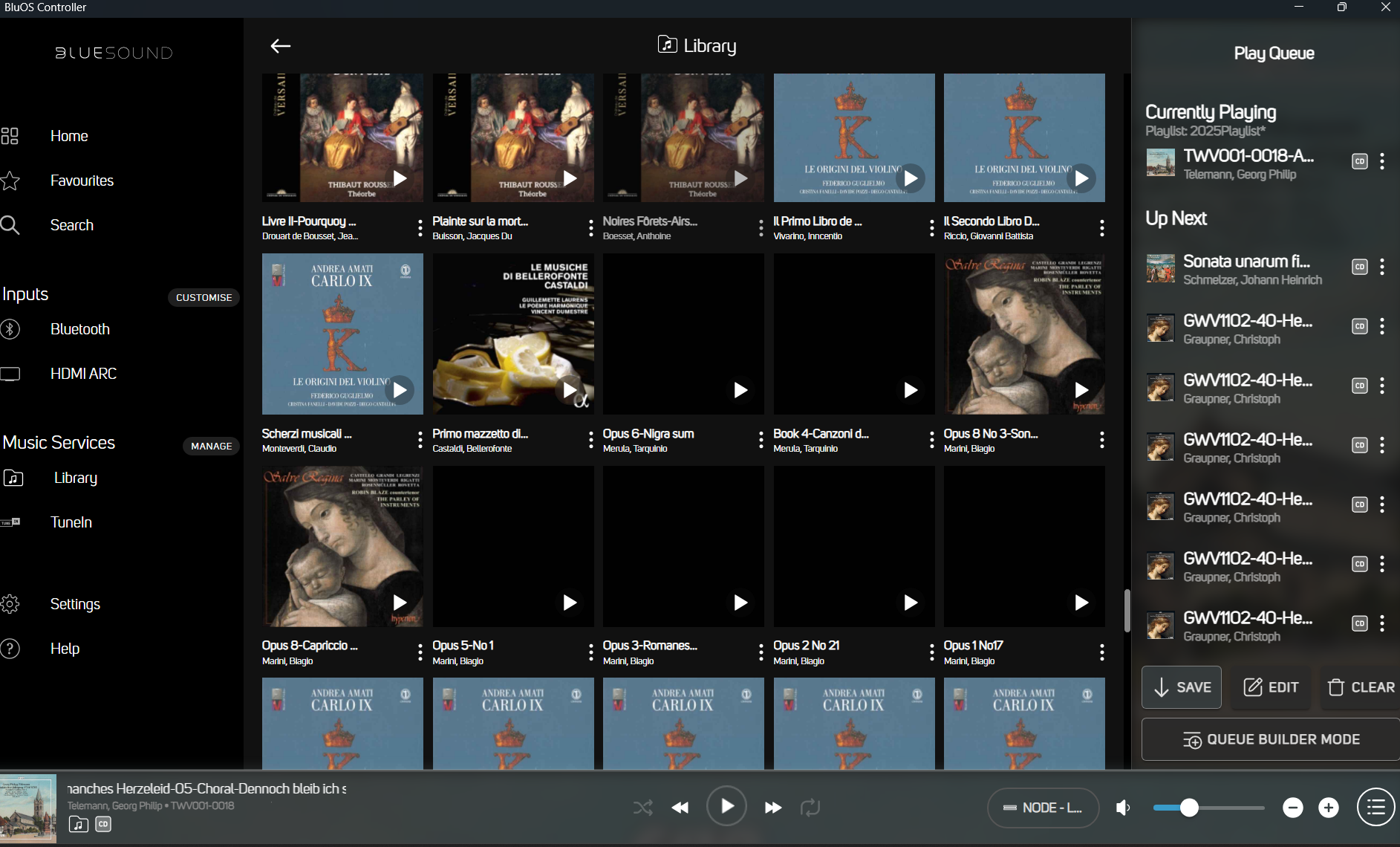
The sample image below shows what I mean. The two blank albums and four blank albums all have the same cover photo as the image (Madonna and Child) between them... works for some but not others. All the images are prepared the same way and tagged in the same way. Because I listen to Classical music I often break recording apart due to multiple composers, multiple pieces of music or different types of music.
-
Offizieller Kommentar

Hi Clifford
The older posts provide answers for you. If you are seeing multiple entries for the same album, the metadata is not matching. It is likely your Album Artists tags (AARTIST) do not match, or your Album Artwork is individual embedded files that do not match.
Please review your metadata. If problems persist, please contact support@bluesound.com after making changes to your metadata and selecting Settings, Diagnostics, Rebuild Index to purge and recreate your locl library index from scratch.
-

Just a wild guess, do you have maybe cover.jpeg or folder.jpeg files in the folder(s). These take precedence over imbedded art.
0 -
Tony W.... did you even read my comment?
I stated directly in the post that all of my tags are custom. I have separated entire CD's into separate albums because the important information is the Composer/Artist and Name/Catalog Number of the work, not the CD that it is released on. Classical Music has horrible tags and if I only want a library that calls everything "Classical" and tags that come with Classical music list Bach as "JS Bach, Johann S Bach, Johann Sebastian Bach, Bach JS, Bachh, Johann Sebastian and Bach Family". My entire music catalog is meticulously tagged by the composers andCatalog Number where available. IE: BWV for Bach, BuxWV for Buxtehund, K#'s for Mozart. To keep a music library organized at this size, I have to blast away the old tags and custom re-do them.
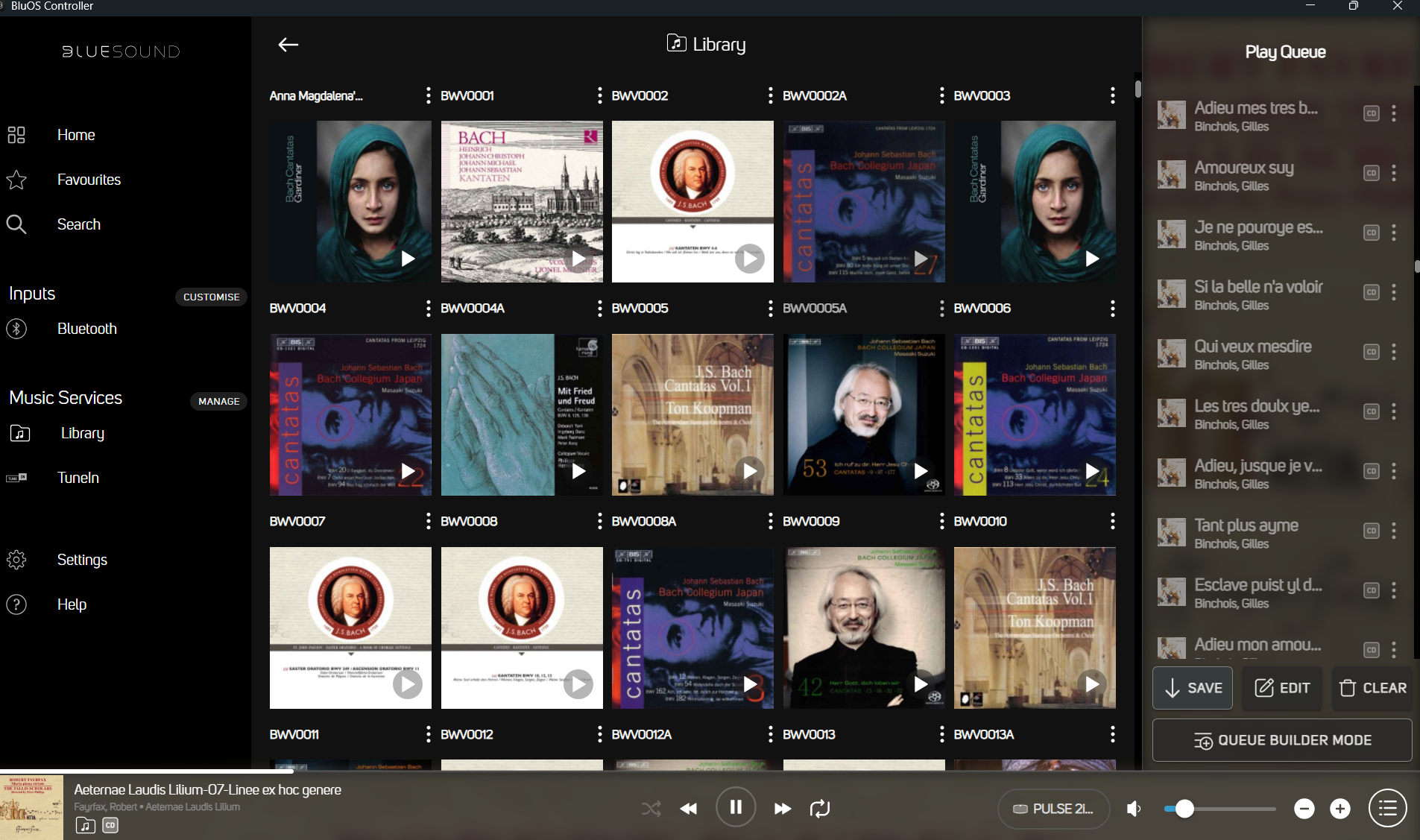
The 8 Tracks shown in the first picture are all from the same CD, but have been split into 8 Albums (all would have the same album art. but each is tagged specifically. I need to know that I have "Opus 5 No 1" by Marini so that if another CD/Download of Marini is offered for sale, I can tell if I already have the music. (Classical recording companies have a bad habit of reissuing music that is identical to past CD's with new album art and I am not rich enouph to waste my money). This is not like Contemporary music like Taylor Swift where you decide if you want to buy her greatest hits album.
These 8 tracks are all put into different file folders and the original album links are destroyed (Original Tags erased), Album art is copied into each folder with the names that I used for the file folder and album name and included in the new tags.
I have quite literally read every help file about this on this web site. I have tried every suggestion as listed in the original post. (I posted about this same issue over 2 years ago). So reading the steps I have taken above... what have I missed. I have been using Bluesound for over 10-15 years now. I am not some newbie when using this software. Album art doesn't appear.... I go through all the steps.... Suddenly one day it solves itself (I have no clue why?)... And then just as suddenly the problem reappears (I have no clue why?)... When it does start happening again it is on different albums (I have no clue why?).
I really don't appreciate being shrugged off (Read the Manual, Stupid). I have been working with Digital music files and FLAC files since the Logitech Squeezbox over 25 years ago. I own two Nodes, a Pulse and a Pulse Mini. I have put up with incredibly buggy versions of the Bluesound software in the early days where each new version brought a whole brand new set of problems.
So again... what have I missed? Why are these covers not appearing? Why do they randomly appear and disappear?
0 -
Answer to Alain DW....
I use Album name-Front for the art name. This is an old naming convention that I had to use for the Logitech Squeezbox. (This was per-standarization for tags for FLAC files so the Squeezbox would always look for those files) So BWV130-front.jpg would be the artwork name. Bluesound should ignore it and only use the tags. I have tried to use the "cover.jpeg" naming on the files missing artwork and it has not helped.
0 -
Hi Clifford
Since you have not opened a Support request as suggested, I have taken the liberty of doing it for you.
Our Support Crew will be in touch via email.
0 -

Interesting mix of cantatas by Rilling and Suzuki ;-)
Did precisely the opposite: moved away from BluOS to a Squeezebox Server (Lyrion), supports multiple genres, multiple artists, tags like conductor, band/orchestra, performer, soloist and so on. Even supports works!
In the process I got improved sound quality (thanks to external DAC), improved radio (not depending on TuneIn) and, for those who find this of interest, support up to 24/768kHz and DSD256 (I do not care about hires for playback).
0 -
Had a good look at your previous posts. The first picture shows two works by Marini that have the cover of the Salve Regina album (op 8 no 3 sonata and op 8 capriccio).
However, the Salve Regina album contains only one single track by Marini, a sonata. The op 8 capriccio is present on the Origini de violino album, the other album with the blue cover in the picture.
This suggests that besides the covers that are not displayed, at least one item (the capriccio) shows the cover of another album.
If indeed the capriccio is correctly tagged with the cover of Original de violino, this would confirm that the tagging is not at fault, but the BluOS indexing algorithm and/or the BluOS controller app probing the indices leads to showing the wrong cover (or no cover at all).
0 -

“ Album art is copied into each folder with the names that I used for the file folder and album name and included in the new tags. ”
Not sure if this will work for your library …To override any other artwork each album folder needs a cover.jpg. This “trumps” all other artwork and takes precedence. When I say cover.jpg I mean exactly that, make a copy of the existing artwork you have in the folder and rename it to cover.jpg
Couple of brain dumps…
You can imbed multiple artworks, not sure if the programs you use can display if you have multiple, this could be an issue if the imbedded is blank and not totally removed.Sometime artwork downloaded is not actually in the jpg format, this caused me massive issues years ago as I discover that artwork had just had its extension altered to jpg. Displays correctly when viewed but cannot be loaded by a streaming software which is looking for a real jpg.
A rebuild index (not reindex) should be used when editing tags / artwork. When having issues I just pop a single album onto a USB memory stick to quickly run a rebuild and make sure the changes work.
0
Bitte melden Sie sich an, um einen Kommentar zu hinterlassen.
Kommentare
8 Kommentare