How to use Android app when connected via VPN?
Beantwortet
I'm connected to bluOS android app while on my phone which is VPN'd home. Seems like the app can't connect via IP directly, so I can't access my devices. Is there any timeline for bluOS app supporting IPs directly?
-
Offizieller Kommentar

Hi Idle
BluOS does not support usage with a VPN on your phone for this very reason. Virtual Private Networks mask the address of your device. BluOS requires mDNS to work which is not routable by design.
Review your VPN documentation about local network access or disable your VPN.
-
I see where you're coming from, but I believe saying that VPNs mask your address isn't quite right.
I'm VPN'ing into my home network. I understand that mDNS doesn't work over VPN, but mDNS is only for discovering IPs and Port #s. For example, I can VPN into my network and then navigate to the IP of each of my devices in a web browser and access them successfully... but since the BluOS app uses mDNS for discovery and you can't set the IP directly (and therefore it seems as though it doesn't support networks where mDNS is disabled).
To me it sounds like a valid feature request to have the BluOS app support direct IP as an alternate to mDNS when it's not available.
0 -
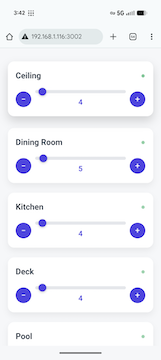
For what it's worth, I just put together a quick service I can run at home so I can at least adjust my levels when I'm on mobile data and VPN'ing into my home network (my backyard doesn't have great wifi so I typically VPN into my home network via cell data).
But yeah, would be nice to just specify IPs directly instead of relying on mDNS for locating ips. I went onto my local network and disabled mDNS and the app doesn't function at all. there are some other local services I use that at least have an IP fallback.
 0
0
Bitte melden Sie sich an, um einen Kommentar zu hinterlassen.
Kommentare
3 Kommentare